

Centralized Asset Information
Summarized and centralized information for Service Agents about Asset Service History.
At a Glance
Salesforce holds the answers — but only if your Service Agents get the right information when resolving an asset related case. With the help of incorporated AI Agents the Centralized Asset Information (CAI) provides an overview of any asset related historic maintenance activities. Based on the summarized information, the Service Agent gets quicker and better transparency about the current state of the asset. This enables the Service Agent to provide solutions quicker to the customer. Quick resolution leads to lower down time and more satisfied customers!
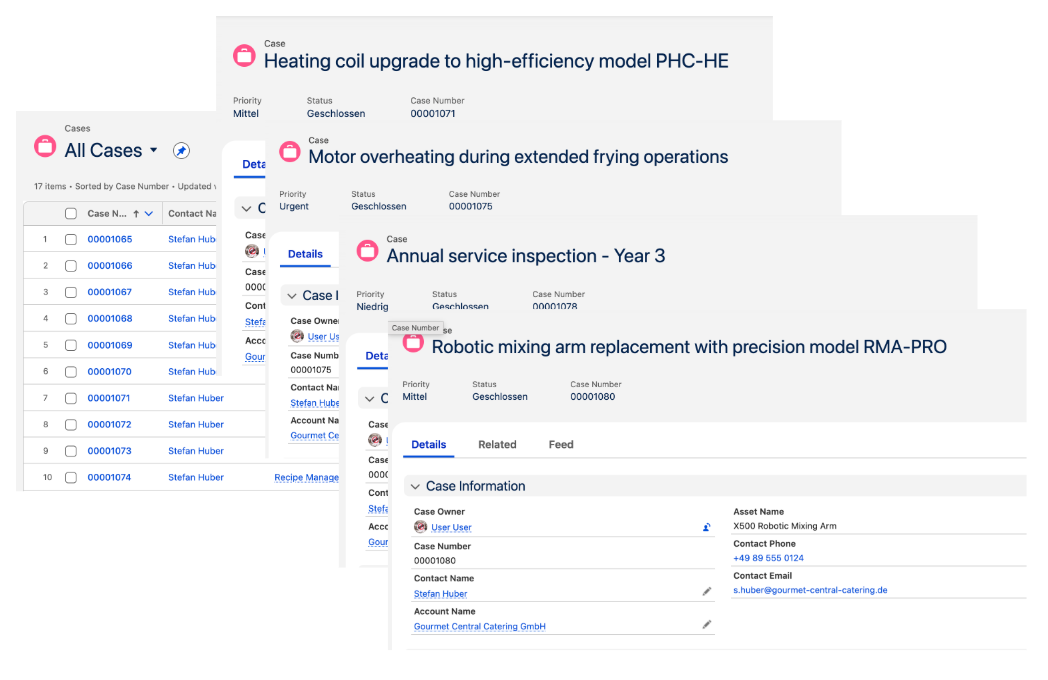
From distributed/hidden information...
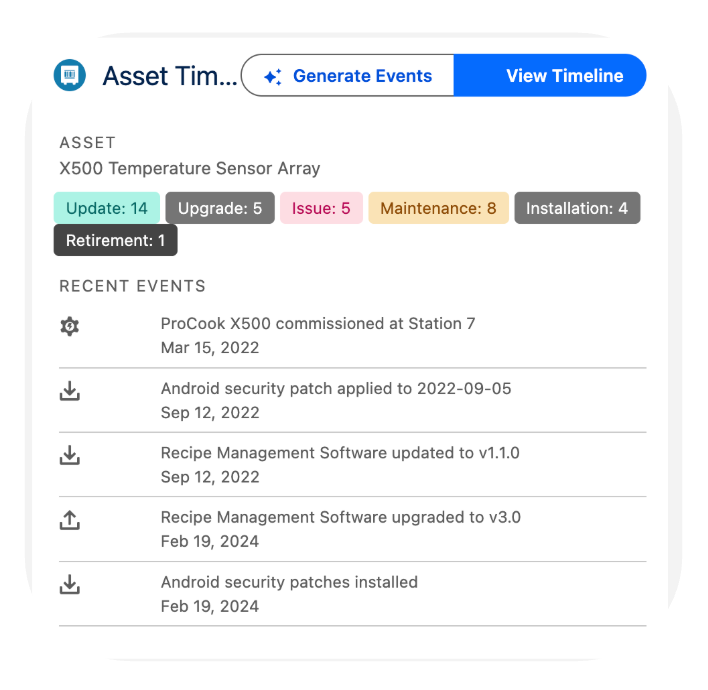
To centrally available information (consolidation of case comments, interfaces and others)...
Above: Multiple historic Cases containing individual fixes related to one asset vs. a centralized view on the asset history!
How It Works

The Challenge
Fragmented Asset History
When a customer contacts support about a malfunctioning asset, Service Agents today face a time-consuming research problem. Critical information about that asset — past repairs, firmware updates, replaced parts, security patches — is scattered across multiple Cases, Work Orders, and conversation threads in Salesforce. Agents must manually scroll through each record to piece together the asset's history, which slows down resolution, increases the risk of missing critical context, and ultimately frustrates customers who expect fast answers. This challenge is further amplified in environments with complex asset hierarchies. A single piece of industrial equipment, for example, may consist of multiple sub-assets such as a control panel or motor unit — each with its own service history. Understanding which component was affected when, and what was done about it, requires navigating multiple layers of records simultaneously.

The Solution
AI-Powered Asset Timeline
Centralized Asset Information solves this by deploying an AI Agent directly within Salesforce Service Cloud. The agent automatically processes both unstructured text — such as Case comments and email threads — and structured data sources like Work Orders. From these inputs, it extracts key service events and distills them into concise, meaningful summaries. These extracted events are stored in a dedicated custom object and surfaced to the Service Agent through an interactive Timeline Viewer, built as a custom Lightning Web Component (LWC). Instead of navigating through dozens of records, the agent sees a single, chronological view of everything that has ever happened to an asset — from the moment they open a Case.
Feature Tour
The Timeline Viewer is designed for speed and clarity in the daily workflow of a Service Agent.
Hierarchical Filtering
Agents can toggle between the full asset view and any individual sub-asset, making it easy to isolate relevant history in complex equipment hierarchies.
Drill-Down Navigation
Clicking on any event in the timeline opens the originating source record — whether a Case or Work Order — for full context without losing the overview.
Keyword Search (planned)
A future release will allow agents to search the timeline by keyword, enabling even faster pinpointing of relevant historical events.

Privacy & Compliance
The AI Agent is governed by predefined instructions that explicitly exclude personally identifiable information (PII) — such as names and email addresses — from all extracted summaries. This ensures that the timeline remains fully GDPR-compliant out of the box.
Technical Architecture
CAI is built entirely within the Salesforce platform and requires only an AgentForce license — no Data Cloud license is needed, significantly reducing the total cost of ownership. The solution consists of four core components:
- Custom Object — stores the extracted asset events, each consisting of 4–5 structured fields.
- Two Apex Classes — collect and prepare data from source objects such as Cases and Work Orders, and pass it to the AI Agent for processing.
- AI Agent (AgentForce) — analyzes the collected text and generates structured event summaries based on defined instructions.
- Custom LWC (Timeline Viewer) — presents the processed events in an interactive, filterable timeline directly within the Service Cloud console.
See it on your own data
Book a 30‑minute demo. We will show you in our Demo environment how Central Asset Information works and how your Service Agents and finally your customers can profit from it. We will have to discuss on how to adapt it to your business challenge!
Book a Demo